Environment Variables
Tracearr uses environment variables for core configuration.
Required Variables
| Variable | Description | Example |
|---|---|---|
DATABASE_URL | PostgreSQL/TimescaleDB connection string | postgres://user:pass@host:5432/tracearr |
REDIS_URL | Redis connection string | redis://localhost:6379 |
JWT_SECRET | Signing key for authentication tokens | 64-character hex string |
COOKIE_SECRET | Cookie signing key | 64-character hex string |
Optional Variables
| Variable | Description | Default |
|---|---|---|
PORT | Port the server binds to inside the container | 3000 |
NODE_ENV | Environment mode | production |
LOG_LEVEL | Logging verbosity | info |
BETTER_AUTH_SECRET | Session signing/encryption key | derived from JWT_SECRET |
TZ | Timezone | UTC |
CORS_ORIGIN | Other origins that may use a signed-in session; * only allows requests without one | none, Tracearr’s own origin |
TRUST_PROXY | true trusts one proxy hop, a number is a hop count, or a comma-separated list of proxy IPs/CIDRs; anything else stops startup | false |
OIDC_ISSUER_URL | OIDC issuer base URL | none |
OIDC_CLIENT_ID | OIDC client ID | none |
OIDC_CLIENT_SECRET | OIDC client secret | none |
OIDC_PROVIDER_NAME | Label for the SSO login button | SSO |
REDIS_PREFIX | Redis key prefix for namespacing | no prefix |
CLAIM_CODE | Claim code for first time setup | none |
BASE_PATH | Base path when served under a subpath | none |
DNS_CACHE_MAX_TTL | DNS cache maximum TTL in seconds | disabled |
GZIP_ENABLED | Enable server-side gzip compression | false |
SHUTDOWN_GRACE_MS | Time running background jobs get to save their place on shutdown, in ms. The default fits Docker’s default stop, so it does not need setting | 8000 |
IMAGE_CACHE_DIR | Where the poster cache is written | /data/tracearr/image-cache |
IMAGE_CACHE_MIN_FREE_PERCENT | Free disk the poster cache leaves on its volume, in percent | 10 |
IMAGE_CACHE_MAX_MB | Hard ceiling on the poster cache size in MB | none |
BACKUP_DIR | Directory for storing database backups | /data/backup |
ENCRYPTION_KEY | Key for destination secrets and email link signatures | derived from JWT_SECRET |
In the compose files, PORT sets the host side of the port mapping, "${PORT:-3000}:3000". The
container always listens on 3000. To reach Tracearr on a different host port, set PORT=8080 in
your .env and leave the container port alone. Setting PORT in the service’s environment:
block moves the port the server binds to, which leaves the published mapping and the image’s
health check pointing at 3000.
Database Configuration
Tracearr requires TimescaleDB (PostgreSQL with the TimescaleDB extension) for time-series data storage.
DATABASE_URL=postgres://tracearr:password@localhost:5432/tracearrRedis Configuration
Redis is used for caching and background job queues.
REDIS_URL=redis://localhost:6379For Redis with authentication:
REDIS_URL=redis://:password@localhost:6379To enable Redis key prefixing:
Redis key prefixes must end with a delimiter (we recommend a colon ”:”) to ensure proper namespacing and avoid key collisions in shared Redis instances.
REDIS_PREFIX=myprefix:Authentication Secrets
Tracearr requires two secrets, each a long random string unique to your installation (generate with openssl rand -hex 32):
JWT_SECRETsigns authentication tokens, including tokens for mobile devices paired on older versions.COOKIE_SECRETsigns cookies.
A third secret, BETTER_AUTH_SECRET, signs and encrypts web and mobile sessions. It is optional: when unset, Tracearr derives it from JWT_SECRET (HKDF-SHA256), so existing installs need no new configuration. Setting it explicitly is recommended. Tracearr fails to start only when neither BETTER_AUTH_SECRET nor JWT_SECRET is set.
A fourth, ENCRYPTION_KEY, is 64 hex characters and also optional. It protects the stored configuration of every notification destination, including SMTP passwords and webhook URLs, and it signs the unsubscribe and browser-view links in newsletter email. Each of the two uses gets its own key derived from this value, so neither can open the other. When ENCRYPTION_KEY is unset both derive from JWT_SECRET by HKDF-SHA256 instead, and existing installs need no new configuration. Set it when you want to rotate JWT_SECRET without re-entering every destination secret.
JWT_SECRET=<64-character hex string>
COOKIE_SECRET=<64-character hex string>
BETTER_AUTH_SECRET=<64-character hex string>  # optional, recommended
ENCRYPTION_KEY=<64-character hex string>      # optional
A malformed value stops the server on start:
ENCRYPTION_KEY is set but is not 64 hex characters; fix or unset itRotating JWT_SECRET while ENCRYPTION_KEY is unset leaves Tracearr unable to read the stored destination secrets. Each affected destination is flagged “Re-enter this destination’s secret” in the list, receives nothing until you do, and cannot be tested.
Rotating JWT_SECRET also changes the derived BETTER_AUTH_SECRET when it is not set explicitly,
which invalidates all web sessions and paired mobile devices. If you run multiple Tracearr
instances against the same database, every instance must share the same BETTER_AUTH_SECRET, or
the same JWT_SECRET when relying on derivation.
OIDC Single Sign-On
Tracearr supports login through an OIDC identity provider (Authentik, Authelia, Keycloak, and similar). OIDC login is enabled only when all three of OIDC_ISSUER_URL, OIDC_CLIENT_ID, and OIDC_CLIENT_SECRET are set. The endpoint for the redirect URI is at /api/v1/auth/oauth2/callback/oidc.
OIDC_ISSUER_URL=https://auth.example.com
OIDC_CLIENT_ID=tracearr
OIDC_CLIENT_SECRET=<from your identity provider>
OIDC_PROVIDER_NAME=Authentik  # optional, defaults to "SSO"
When configured, the login page shows an SSO button labeled with OIDC_PROVIDER_NAME, and the Single sign-on switch appears under Settings → Access → Sign-in. On a fresh install the first person to sign in through the provider becomes the owner. Afterwards the button also signs in admins and members who are allowed to and have a live account on a server open to them, matched to a Tracearr identity by the IdP profile’s email or preferred_username; see Member sign-in.
Reverse Proxy
Behind an HTTPS reverse proxy, logins work as long as the proxy preserves the Host header, forwards X-Forwarded-Host with TRUST_PROXY set, or CORS_ORIGIN lists the public URL. The last one covers password sign-in but not SSO, which needs the public host from Host or a trusted X-Forwarded-Host. Forward X-Forwarded-Proto so session cookies carry the Secure attribute over HTTPS.
TRUST_PROXY=trueTRUST_PROXY=true trusts one proxy hop, the usual single reverse proxy: the client address is the one your proxy appended to X-Forwarded-For, anything a client wrote to the left of it is ignored, and X-Forwarded-Host is honored. Two chained proxies, such as Cloudflare in front of your own, need TRUST_PROXY=2; a comma-separated list of proxy IPs or CIDR ranges works too. The value is read without regard to case; false or 0 trusts nothing, and anything that is not true, false, digits, or a list of IPs and CIDR ranges stops the server on start with TRUST_PROXY: "yes" is not an IP address or CIDR range. Use true, a hop count, or a comma-separated list of proxy IPs/CIDRs. The resolved address is what sign-in rate limits count, what sessions record, and what Tracearr forwards to Jellyfin when a member signs in through it. Without it, X-Forwarded-Host is ignored, since anyone could claim any host with it. The live-update socket follows the same host and origin rules as the API.
The web app is served from Tracearr’s own address and needs nothing in CORS_ORIGIN. A request that carries the session cookie is accepted only from that origin (either scheme) or from an origin listed in CORS_ORIGIN; a write from any other page is refused with “This request did not come from Tracearr.” List other addresses that need a signed-in session, comma-separated, and set CORS_ORIGIN=* only to let any page call the public API with an API key: a wildcard never grants a session.
CORS_ORIGIN=https://dash.example.com,https://tracearr.example.comThree API paths answer without a login by design, and an authenticating proxy such as Authelia, Authentik or a Cloudflare Access policy must let them through:
/api/v1/email/unsubscribe/*
/api/v1/newsletters/view/*
/api/v1/images/proxy
The first is the unsubscribe page every newsletter links to; the second is the browser view of a digest that was sent; the third serves hosted poster images to mail clients. Gating the first two shows members a login page instead of the page they asked for, and gating the third leaves hosted posters blank. The first two carry their own limit of 60 requests a minute.
Reverse proxies that rewrite the Host header must forward X-Forwarded-Host with TRUST_PROXY
set (or list the public URL in CORS_ORIGIN) for cookie login to work.
Claim Code
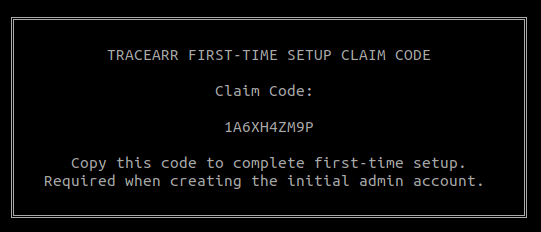
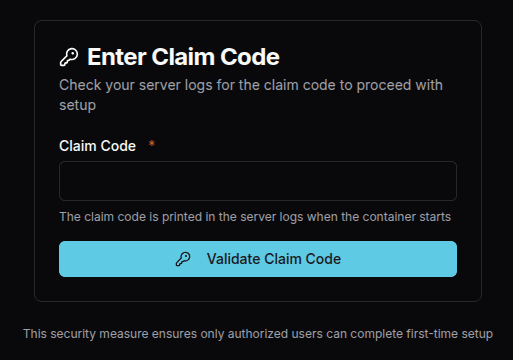
The CLAIM_CODE environment variable is used to protect the initial setup page.
This is recommended when Tracearr is exposed to the public internet.
When set, the claim code will be printed to the log on startup.
Before you can access the setup page, you must enter the claim code.
Base Path
Set BASE_PATH when you want Tracearr to be served under a subpath.
This ensures all routes, assets, and links are prefixed correctly.
BASE_PATH=/tracearrYou only need to set this if Tracearr is accessed through a reverse proxy under a subpath (e.g.
https://example.com/tracearr). If Tracearr is served at the root, this can be left unset.
DNS Cache
Set DNS_CACHE_MAX_TTL to enable DNS caching for outgoing requests.
This can improve performance by reducing the number of DNS lookups for frequently accessed hosts.
DNS caching is disabled if DNS_CACHE_MAX_TTL is not set.
DNS_CACHE_MAX_TTL=3600Tracearr will respect the TTL provided by the DNS server, but will not cache entries longer than
the value set in DNS_CACHE_MAX_TTL. Error responses (e.g. DNS resolution failures) are not
cached to ensure that transient issues do not persist longer than necessary.
Gzip Compression
Set GZIP_ENABLED=true to enable server-side gzip compression for HTTP responses.
This compresses static assets and API responses, reducing bandwidth usage.
GZIP_ENABLED=trueMost deployments sit behind a reverse proxy (e.g. Nginx, Caddy, Traefik) that already handles compression. Only enable this if Tracearr is serving traffic directly without a compressing proxy in front of it. \ Enabling gzip will slightly increase CPU usage on the server.
Poster Cache
Tracearr keeps one 360×540 copy of every poster under IMAGE_CACHE_DIR and keeps it until the
poster changes or its item leaves the library. Nothing is evicted to make room. When free disk on
that volume would fall under IMAGE_CACHE_MIN_FREE_PERCENT the cache stops growing, the precache
pass reports disk-limited in Settings → Servers → Posters, and posters that are not cached are
fetched from the media server on request. A library of 100k posters needs about 2 GB.
That path has to be on a mounted volume. The supervised image puts it inside the tracearr_data
volume, so there is nothing to configure. The standard Docker image expects a named volume at
/data/tracearr/image-cache, which the compose example creates as tracearr_images. Without one
the cache lives on the container’s writable layer and is thrown away every time the container is
recreated, so every poster is downloaded again on the next pass. On a large library that is hours
of requests to your media server. Settings → Servers → Posters warns when it detects this, and from
2.8.0 the warning clears on the first restart with a volume in place.
A host path works at that mount point too, but only if the server can write to it. The standard
image runs as UID 1001 and does not read PUID, PGID or UMASK, so a host directory owned by
root or by a NAS user is usually not writable by it:
sudo chown -R 1001 /path/to/image-cacheA named volume needs none of this, because Docker creates it with the ownership the image sets.
When a write is refused, 2.8.0 and later log [ImageProxy] Cannot write to the poster cache at ...
once, with the error code and the UID the server runs as. Posters still load, but each one is
fetched from the media server on every request until the directory is writable.
Backup Directory
Set BACKUP_DIR to customize where Tracearr stores database backups. The default location is /data/backup inside the container.
BACKUP_DIR=/custom/path/to/backupsWhen using Docker, the default /data/backup path is already configured as a volume. If you
change this, ensure the directory exists and is writable, and mount it as a volume if needed.
See Backup & Restore for full documentation.